
One platform for your whole restaurant. From QR scan to invoice.
A guest scans the QR code at the table and orders on their own, and the order lands on the kitchen screen right away. Everything else — payments, reservations, reports — happens in the same system.
The demo is open to everyone — sign in as demo@veruno.app / demo1234. Data resets to its starting state every night, so click around freely.
Features
Built separately for the restaurant and for the guest
Veruno serves both sides of the table — the team in the kitchen and on the floor, and the guest with a smartphone. Pick a side to explore.
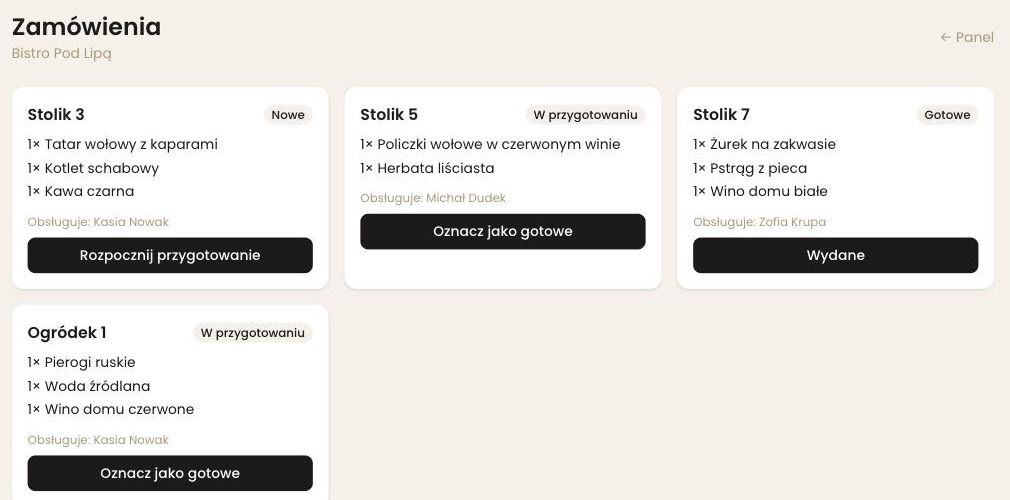
Real-time POS/KDS
An order placed at the table lands on the kitchen and bar screen the instant it's sent — no paper tickets, no shouting through the pass. Owner, manager, waiter, kitchen and bar each get their own view and permissions.
Waiter with a tablet, no QR needed
Not every guest wants to scan a code — older guests, guests without a smartphone, or those who simply prefer to say what they want. The waiter picks a table on a tablet, taps through the menu, and the order reaches the kitchen the same way it would from a guest's phone.
QR codes ready to print
A table card with your venue name, table number, the code and a short instruction for the guest — one click, as a PDF. A set for the whole room, or just the SVG if someone else designs your stickers.
Service in your guest's language
Guests pick a language once, after scanning the code, and keep it for the whole visit — menu, order, status and payment. You write the dish names and descriptions yourself, because nobody outside the kitchen knows what goes into a regional dish. Allergens translate themselves, being a statutory list. An untranslated item shows the original, so a new dish never vanishes from the foreign version.
Payments, tips and invoices
PayU and Przelewy24 configured per restaurant, percentage or fixed-amount tips, and cash confirmed by staff. Once a bill is paid the VAT invoice issues itself — numbered per location and filed to KSeF.
Reservations and regulars
You set the booking slots yourself; guests reserve and cancel online up to a cut-off you choose. After the visit the loyalty program adds up on its own — stamps or points, with reward thresholds set in the panel.
Reports with CSV export
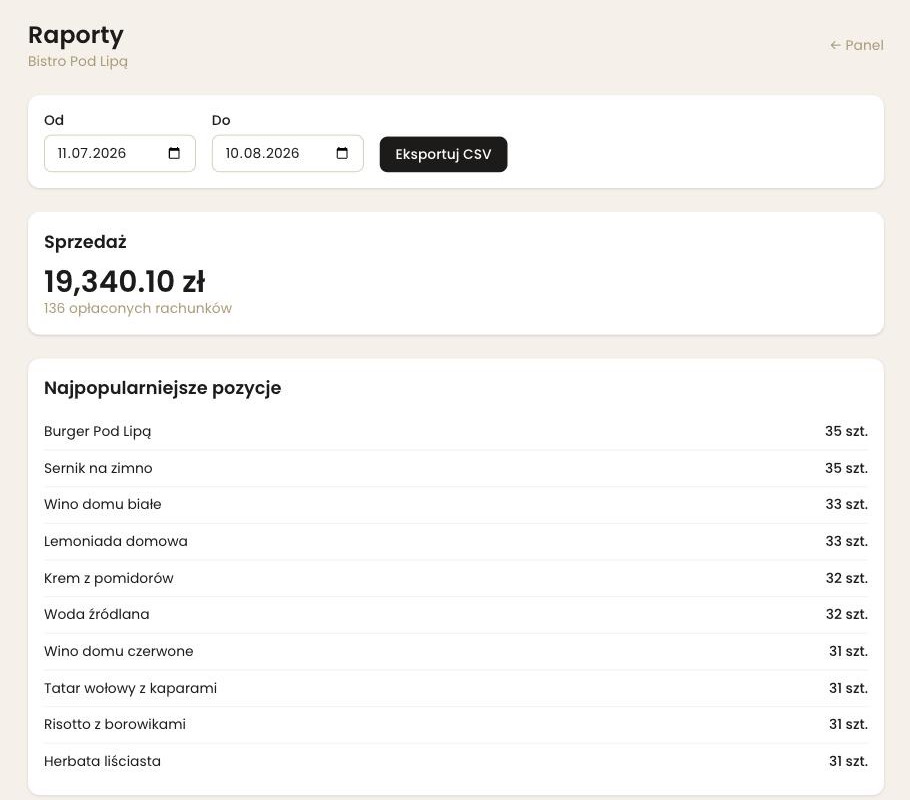
Sales, menu item popularity and tips per waiter — ready to download and hand to your accountant.
Menu and tables, no coding
Categories, items, variants, allergens and per-table QR codes — you configure it all in the manager panel, with no developer involved.
Integrate with your POS
One toggle in the panel — new orders and status changes are delivered securely (HMAC-signed) to your external POS, with no engineering work on your side.
No waiting for a waiter
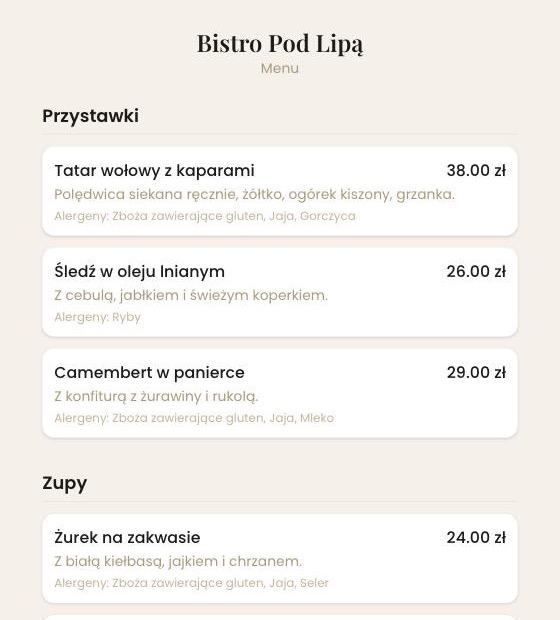
Scan the QR code on your table, browse the menu with photos and allergens, and order in a few taps.
Live order status
You see exactly where your dish is — no guessing, no waving at the kitchen.
Pay however suits you
Card or BLIK online with an optional tip, or cash at the table. Need an invoice? Tick the box at checkout and download it straight away, without emailing the restaurant.
Nothing to install
Veruno runs as a PWA straight from the browser — and if you want, add it to your home screen in one tap.
The whole guest interface works in Polish and English — handy for places in tourist areas.
Screens
This is what you get
Screenshots from the live demo — not mockups. These are the screens you see after signing in.
How it works
From a scanned code to an invoice — five steps
The guest's journey and the kitchen's workflow happen in the same system, at the same time.
Scan and sign in
The guest scans the table's QR code and signs in with a phone number, Google or Apple.
Menu and order
They browse categories, variants and allergens, and add items to the cart.
Live POS/KDS
The order lands on the kitchen or bar station instantly, over WebSocket.
Payment and tip
Online by card or cash, with a percentage or fixed-amount tip.
Loyalty and invoice
Loyalty points are awarded automatically, and the VAT invoice goes straight to KSeF.
Foundations
A solid technical foundation, not an experiment
Veruno is built on a deliberately simple architecture: one server, a predictable cost, full control over your data — without depending on sprawling cloud infrastructure.
Per-restaurant data isolation
Each location has its own database — menu, guest and payment data never mixes between restaurants on the same platform.
Code-level security review
Role permissions, login-abuse protections and tenant isolation go through a regular review aligned with OWASP principles, backed by hundreds of automated tests run on every code change.
Predictable running cost
One VPS instead of usage-based billing across several cloud services — cost doesn't spike with traffic.
Real-time, no lag
Orders and statuses update over WebSocket (Laravel Reverb) — no page refreshes, no delays in the kitchen.
Pricing
Plans that fit the size of your restaurant
Indicative rates based on our review of the restaurant-software market in Poland — below the market average, with no hidden fees.
You buy the plan online — payment is handled by PayU: BLIK, card or instant transfer, settled in Polish złoty. Buying through the site starts monthly billing; discounted annual billing is arranged by e-mail, because it comes with a separate contract. Prices are net of 23% VAT.
Start
For a single restaurant, café or food truck getting started with digital ordering.
- QR table ordering
- Digital menu with variants and allergens
- Menu in your own colours, with dish photos — free
- Real-time POS/KDS
- Online payments (PayU, Przelewy24) and cash
- Percentage and fixed-amount tips
- Guest PWA — up to 15 tables
Growth
The full toolkit for a restaurant that wants to retain guests and stay on top of its reporting.
- Everything in Start, unlimited tables
- Online reservations, no deposit
- Staff and role management
- Sales and tip reports with CSV export
- VAT invoicing with KSeF integration
- External POS integration (webhook)
- "Order ready" push notifications
Network
For restaurant groups and chains managing several locations from one place.
- Everything in Growth, for every location
- Multiple restaurants under one owner account
- Dedicated onboarding and data migration
- Priority support with an agreed SLA
- Custom integrations beyond the standard webhook
Add-on modules
You add only what you actually need
Every module works with any plan, is billed separately and can be switched off in any month.
Costs and recipes
PLN 99net / month
The rest of the system tells you what you sold. This module tells you what you earned on it.
- Recipes with ingredient cost and food cost per dish
- Stock that depletes itself from sales, no POS integration
- Purchase invoices from KSeF, PDF/XML or entered by hand
- A posted invoice recalculates food cost by itself
- Stocktake with the shortage priced in money
Service in your guest's language
PLN 39net / month
The same QR code, and a foreign guest orders and pays without asking a waiter for help.
- The whole journey: menu, cart, order status, payment, invoice
- One tap to switch — no second code on the table
- You write the names and descriptions yourself
- Allergens translate themselves — a statutory list
- An untranslated item shows the original
- Ten languages, from English to Dutch
Loyalty program
PLN 29net / month
A standalone loyalty system costs several times as much and has no idea what the guest ordered.
- Stamps or points awarded automatically once the bill is paid
- The card lives in the guest's phone, no separate app
- You set the reward thresholds and change them at will
- The balance updates on screen the moment they pay
- Collected stamps stay put if you pause the module
Bill splitting
PLN 19net / month
Four guests, one bill, and no arithmetic on a napkin at the till.
- Split evenly — each guest pays from their own phone
- Own amount — the guest types in how much they put in
- By item — they tick their schnitzel and beer
- The bill stays open until it reaches zero
- Tip and VAT invoice taken from the guest's share
Operational add-ons
Added one at a time, when you need them
from PLN 49net / month · on top of any plan
Smaller than the modules above and not every restaurant needs them — but when you do, nothing else takes their place.
- Menu in your venue's colours — accent colour, header with your logo, tiles and photos next to dishes. Included in every plan, at no extra cost.
- Additional location — another venue under the same brand, billed separately. PLN 79/month per venue.
- POS integration — orders and their statuses passed through to your point-of-sale system. PLN 49/month
- Priority support — a reply within four working hours and support by phone. PLN 99/month
Indicative net rates (local VAT applies), estimated from our 2026 review of the restaurant-software market in Poland. This is not a binding commercial offer — we approach every restaurant individually and agree on a final quote together, based on table count and the features you choose.
FAQ
Frequently asked questions
How long does it take to roll out Veruno in my restaurant?
Can the menu be shown in several languages?
Do I need to buy extra hardware?
Which payment gateways do you support?
Are VAT invoices sent to KSeF automatically?
Is my data safe on a platform that serves many restaurants?
Can I change plans during my contract?
I run several locations — can I manage them from one account?
I already have a POS system — can it connect to Veruno?
Let's talk about your restaurant
Book a free walkthrough — we'll show you Veruno live and help you pick the plan that fits your table count and how your team works.
Response time
We reply within one business day
Coverage
We work remotely with restaurants across Poland